Managing Rebates, Schemes and Claims on Zoho Books
How Indian distributors and manufacturers on Zoho Books handle rebates, trade schemes and claims — where the ledger ends and the claims workflow begins.
Zoho Books records the transaction — the invoice, the credit note, the ledger entry. Rebates, trade schemes and distributor claims are the rules around those transactions: who qualifies, at what rate, on which sales, backed by what evidence. Zoho Books is where a settlement lands as an accounting entry; it is not where the scheme is computed or the claim is validated. That work — accrual, validation, approval — is what most Indian teams still run in spreadsheets beside Zoho Books. This article is about where the ledger ends and the claims workflow begins.
What Zoho Books handles well
Zoho Books is a capable cloud accounting system, and nothing here argues you should move off it. It keeps your ledgers in one place, issues GST invoices, records credit notes, and reconciles bank statements — the core accounting a distributor or manufacturer needs, available from anywhere. For a finance team that has outgrown a desktop tool, that cloud-first model is a genuine step up. The specific features available depend on your Zoho Books plan, so check Zoho's own documentation for what yours includes.
What it is built to do is record and report on transactions that have already been decided. An invoice is raised, a payment comes in, a credit note is issued, and the books reflect it. Zoho Books does that job well, and it is the system of record for your accounting.
The distinction that matters for this article is between recording a transaction and deciding it. A credit note in Zoho Books captures that a distributor is owed a certain amount. It does not, on its own, work out why that amount is owed, whether the scheme it settles was calculated correctly, or whether the claim behind it was valid. Those are separate questions — and they are where scheme and claim work actually lives. That work is the province of a claims management process, not the ledger.
Where scheme and claim work ends up outside the ledger
Five things tend to fall outside the ledger.
First, the scheme circular itself has no home in Zoho Books. A quarterly volume scheme, a slab-based trade scheme, a display incentive — each is a set of rules with rates, eligibility, caps and a claim window. Zoho Books has no place to hold that rulebook, so it lives in a PDF and a spreadsheet.
Second, secondary sales sit in the distributor's books, not yours. Many schemes pay on what the distributor sells onward — sell-through — not on what you sold in. That secondary-sales data arrives from a DMS or from distributor statements, and it never touches your Zoho Books ledger. Yet it is the base for secondary scheme settlement and for calculating distributor claims.
Third, a claim is evidence, not an entry. A distributor claim is a bundle: the circular it is filed against, the invoices, the stock or liquidation declaration, sometimes photos of a display. Zoho Books records the money once a claim is settled; it is not built to hold and validate the evidence that justifies the claim in the first place. That is the job of a distributor claims workflow.
Fourth, validation runs across four data sources at once. To approve a claim, finance recomputes it: the scheme rate on the correct base, checked against primary sales, secondary sales and any caps — data that lives in the circular, your invoices, the DMS and the claim file. No single one of those is in Zoho Books, so the validation happens in spreadsheets alongside it. This cross-system matching is exactly what ERP integration for claims and rebate software is about.
Fifth, the accrual has to be computed and carried. A rebate you will owe at quarter-end is a liability building up every month. Someone has to calculate that accrual and keep it current so the number is not a surprise. Zoho Books can hold a journal for it, but it does not compute it from scheme rules and sales — that is rebate management work. Leave any of these five outside a disciplined process and you get revenue leakage: claims paid twice, schemes miscalculated, accruals that do not match settlement.
The credit note is the join
Here is the clean division of labour. The claims system decides what is owed and why: it holds the scheme, validates the claim against the evidence, runs it through approval, and produces a settlement figure with a full trail behind it. Zoho Books then issues and posts the credit note for that figure against the distributor's account. The credit note's document number is what ties the two together — one side has the reasoning, the other has the accounting entry, and the number is the join.
That join is also where GST lives. Whether a settlement is a financial or a tax credit note changes how it is reported, as set out in financial vs. tax credit notes under GST, and any credit note has to be reconciled back against the returns — the discipline in reconciling scheme credit notes to GSTR-2B/3B and in GST adjustments to channel settlements.
On the ClaimDS side, the connection to Zoho Books is a file-exchange principle, not a built connector: ClaimDS computes the settlement and exports it as an Excel/CSV file, which your team uses to post the matching credit note in Zoho Books. <!-- TODO: confirm capability wording with founder --> ClaimDS does not ship a native Zoho Books integration, and nothing here should be read as one. <!-- TODO: confirm capability wording with founder -->
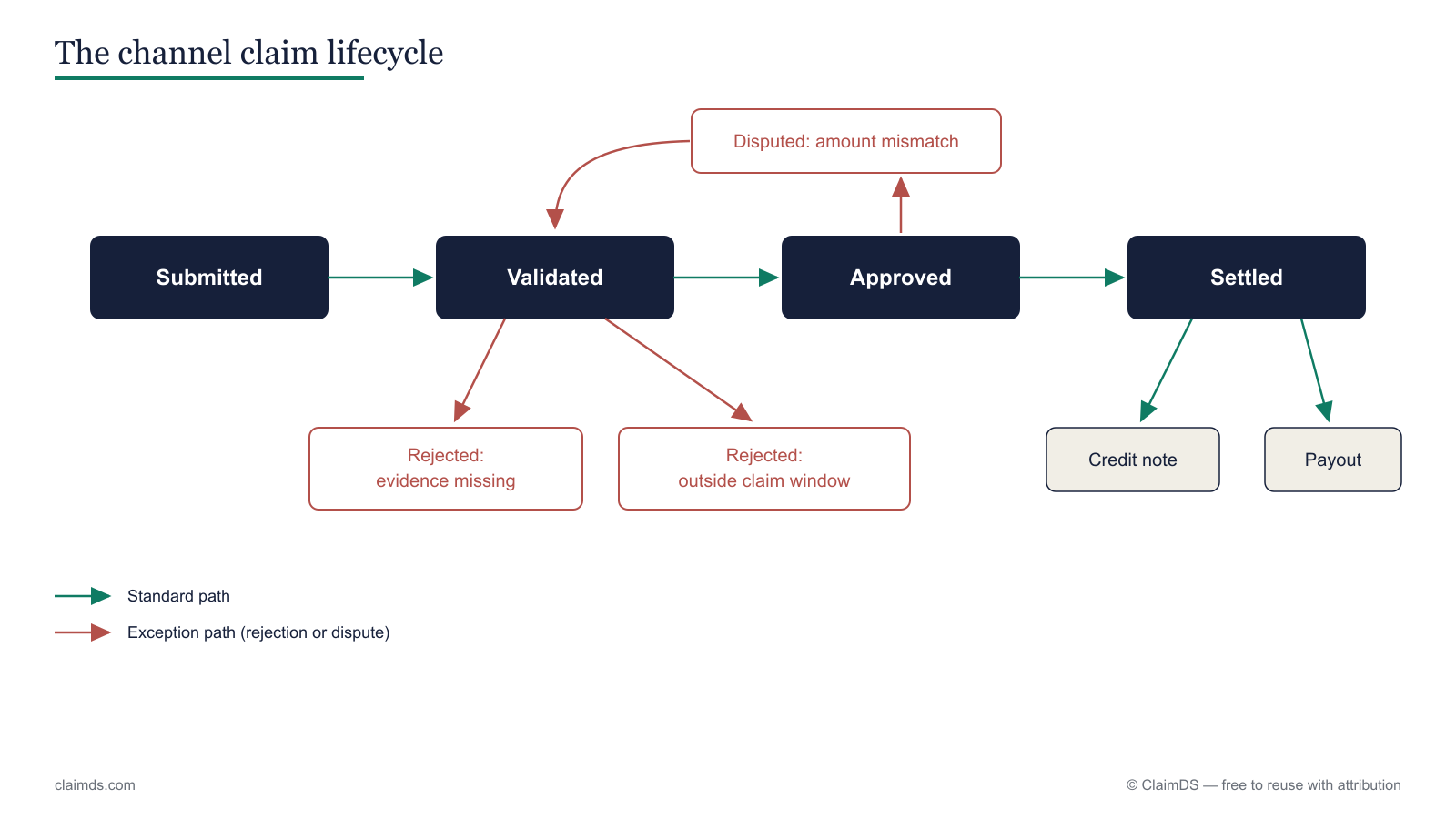 The claims system decides what is owed; the credit note posted in Zoho Books is the join.
A practical setup
A workable setup keeps each system doing what it is good at. In order:
- Keep claims and schemes in a claims system. Hold each scheme circular, file every claim against it with its evidence, and compute accruals and validate claims against the rules — instead of one spreadsheet per scheme. This is the core of claims management and distributor claims work.
- Validate and approve there too. Recompute each claim from the base, flag mismatches, breached caps and duplicates, and route it to the right approver by value — the pattern documented in the claim approval workflow.
- Post settlements as credit notes in Zoho Books. Once a claim is approved, issue the credit note against the distributor in Zoho Books, carrying the right value and GST treatment, with the claim's reference number on it.
- Reconcile once, from an export. Take an Excel/CSV export of settlements from the claims system and match it against the credit notes posted in Zoho Books and against the returns, so accrual, settlement and ledger all agree.
In ClaimDS, steps 1, 2 and 4 run inside the product — schemes and claims held in one place, validated and approved, then exported as Excel/CSV for posting and reconciliation — while Zoho Books stays the accounting system of record. <!-- TODO: confirm capability wording with founder --> The same file-exchange approach works regardless of which accounting system you run; the ERP integration guide covers the data flows in more depth, and the deduction-management and channel rebates in India articles cover the wider process. The settlement and reconciliation surfaces are described in settlement and payout management, claims and deduction reconciliation and GST credit-note reconciliation.
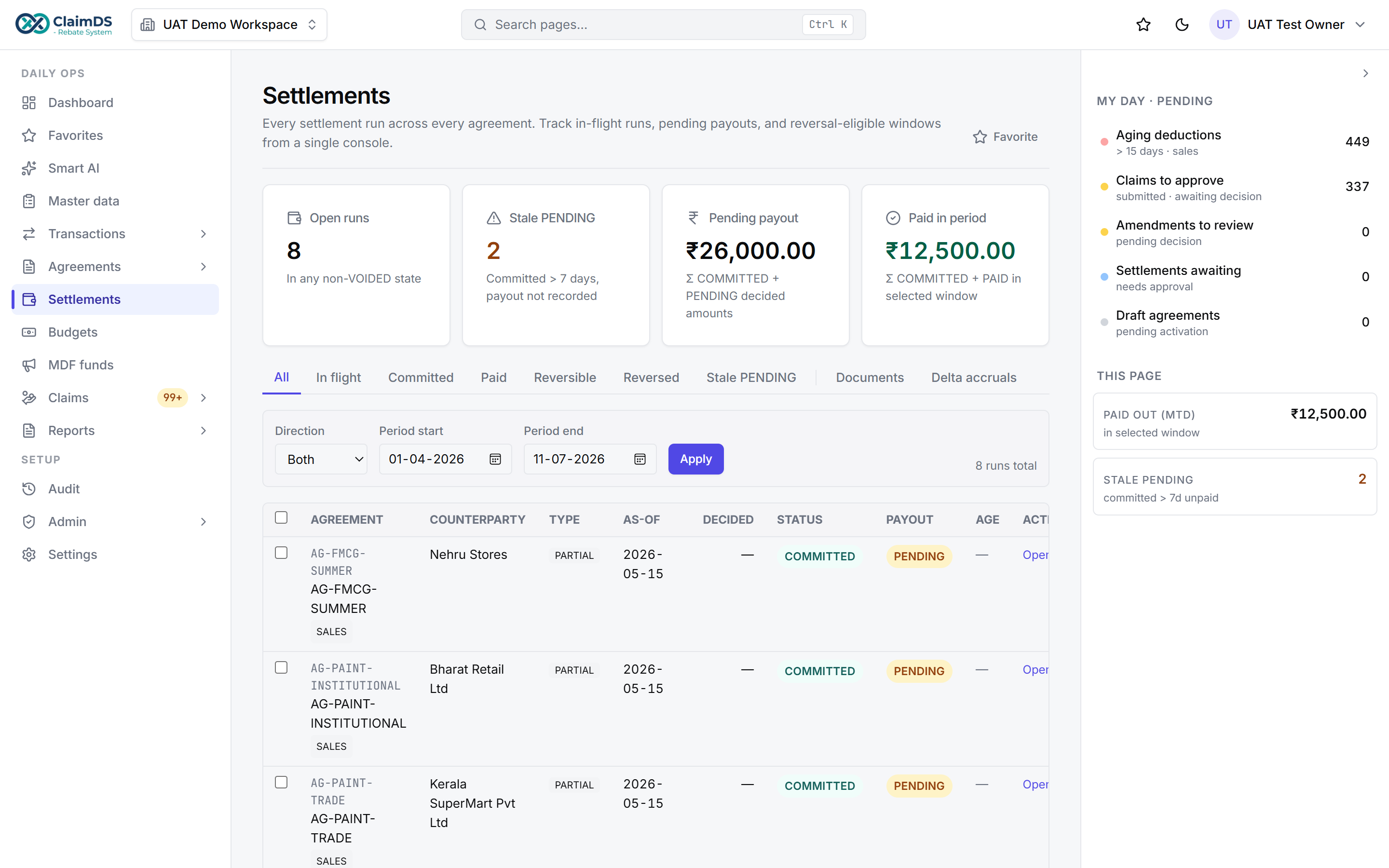 Settlements computed in ClaimDS, then posted as credit notes in your accounting system.
Where this leaves you
If you run on Zoho Books, you do not need to replace it to get scheme and claim work under control — you need to stop running that work in spreadsheets beside it. Let the claims workflow decide what is owed and why, let Zoho Books post the credit note, and reconcile the two from a single export. The same principle applies whatever your accounting system — see where scheme and claim management sits alongside your accounting system, or the equivalents for teams running Tally and Busy. Book a demo to see the claims-and-settlement workflow running alongside your accounting system.
Frequently asked questions
Can Zoho Books handle distributor claims and trade schemes?
Zoho Books is accounting software — it records invoices, credit notes and ledger entries. Trade schemes and distributor claims are the rules and evidence around those transactions: eligibility, accrual, validation and approval. Whether your plan covers any of that is worth checking in Zoho's own documentation. Most teams run the scheme and claim logic separately and post the result back as accounting entries.
How do I record a scheme settlement as a credit note?
Once a claim is validated and you know the amount owed and the reason, the settlement is posted as a credit note against the distributor in Zoho Books. The credit note carries the value, the GST treatment and a reference number. That reference number is what ties the accounting entry back to the specific claim it settles, so the two can later be reconciled.
Do I need separate software if I use Zoho Books?
Not necessarily to start. Many teams track schemes and claims in spreadsheets beside Zoho Books, and that works until volume, partners and scheme variety grow. The point where accruals stop reconciling and claim evidence is scattered across emails and files is usually when a dedicated claims workflow earns its place. Zoho Books stays the system of record for the accounting.
How does ClaimDS work with Zoho Books?
At the pointer level, the link is file-based, not a native connector. ClaimDS computes the settlement and exports it as an Excel or CSV file; your team uses that file to post the matching credit note in Zoho Books, and to reconcile. There is no dedicated Zoho Books integration — the same export-import principle works with any accounting system.
Where do rebate accruals sit if Zoho Books holds the ledger?
A rebate accrual is a liability that builds up before it is settled — the amount you expect to owe at scheme close. It is computed from scheme rules and sales data, which live outside Zoho Books, then carried as a journal in the ledger. Keeping the computed accrual and the posted settlement in step is what stops quarter-end surprises.
See ClaimDS on your own claims data
A 30-minute walkthrough tailored to how your channel actually settles claims.
Related posts

Scheme and Claim Management Beside Your Accounting System
What belongs in your accounting system and what belongs in a claims system beside it — schemes, claims, accruals and settlements, whatever ERP you run.
How to Move Rebate and Claim Work Off Spreadsheets
A practical guide to migrating rebate, scheme and claim work off spreadsheets — what to extract, how to map schemes, handle history, and cut over.
How Much Does Rebate and Claims Software Cost in India?
What Indian manufacturers actually pay for scheme and claims software — pricing models, what drives cost, the costs quotes leave out, and how to compare.