
How to Move Rebate and Claim Work Off Spreadsheets
A practical guide to migrating rebate, scheme and claim work off spreadsheets — what to extract, how to map schemes, handle history, and cut over.
Moving scheme and claim work off spreadsheets is a data-and-process migration — not a rip-and-replace of your accounting system. It runs in six steps: inventory what you run, extract and clean the data, map each scheme to a structured agreement, decide how much history to bring, run one full cycle in parallel, then cut over. Your accounting system — Tally, Busy, SAP or any other ERP — stays exactly where it is. This is the how; for the why, see the companion guide to tracking accruals without spreadsheets.
Step 1 — Inventory what you actually run
You cannot migrate what you have not counted. Before touching a single tool, list every moving part of your current spreadsheet setup:
- Scheme types — every volume slab, growth target, QPS, secondary scheme and dealer incentive you presently run. The types of trade schemes in India guide is a useful checklist here.
- Agreements — who each scheme applies to, its rate, and its date window.
- Open claims — everything submitted but not yet settled.
- Accruals — the running balances you owe, or are owed, under each scheme.
- Partner master — the distributor, dealer and stockist list, with codes.
- Locations — which workbook lives where, who owns it, and who edits it.
As you list schemes, tag each one active or lapsed — you migrate only what is still running, and expired schemes belong in the archive you decide on in Step 4. Most teams are surprised at the count: schemes hidden in email threads, an accrual tab nobody maintained, three versions of the "final" partner list. This inventory is the foundation of every later step — and often the first time distributor claims work is written down in one place. Where a term is unclear, the glossary settles it.
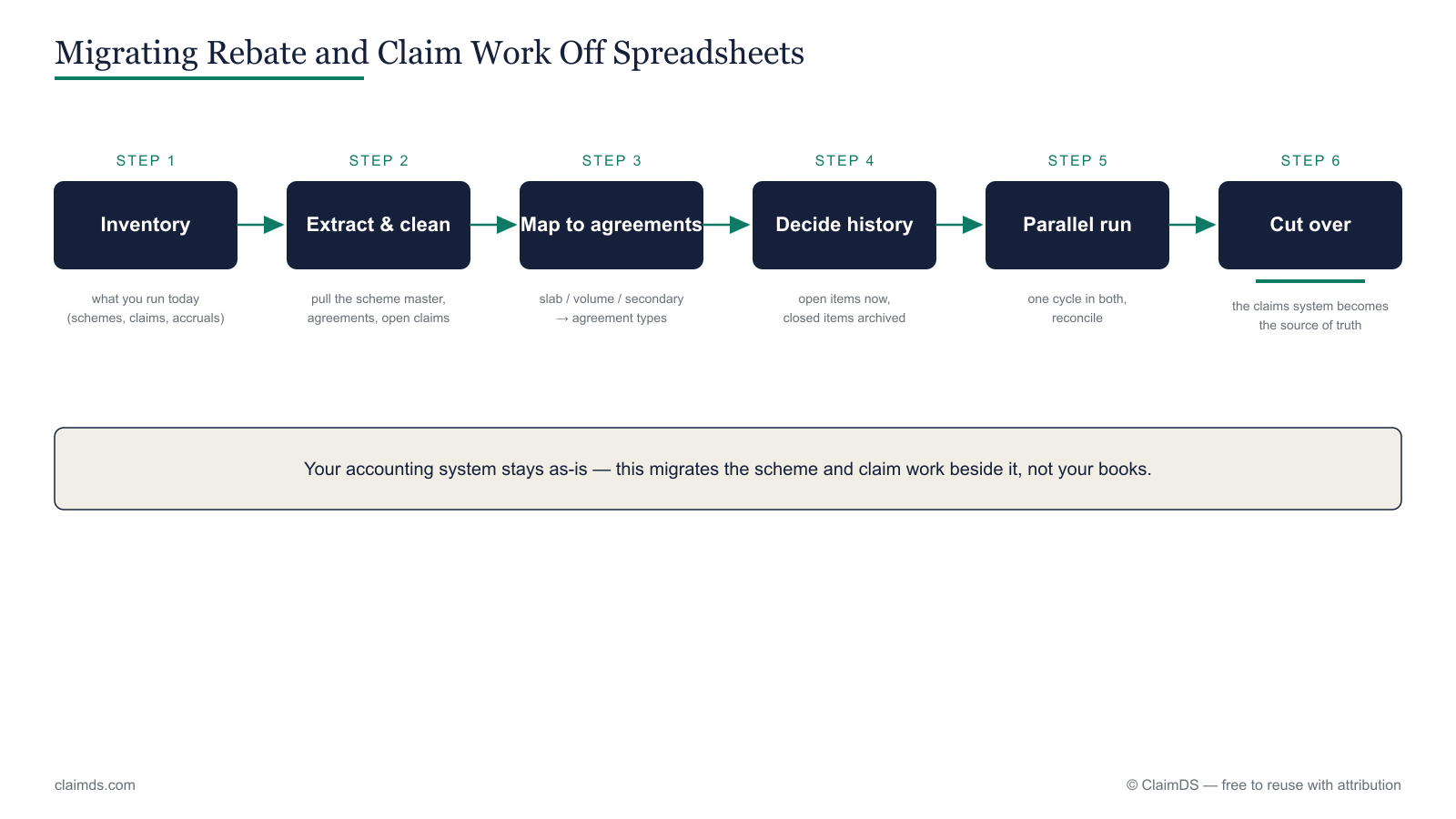 Migration is a sequence, not a switch: inventory, extract, map, decide history, run parallel, cut over.
Step 2 — Extract and clean the data
Now pull the data out. Six things need extracting: the scheme master, the agreement terms (base, rate, slab, window), open claims, accrued balances, the partner/distributor master, and settlement history.
Extraction is the easy half. Cleaning is where migrations stall. Spreadsheets tolerate mess that a structured system will reject: partner names spelt three ways, SKU codes that do not match the ERP, dates stored as text, blank rate cells filled in from memory. Clean this before import, not after — a system built to validate will bounce dirty data straight back at you, which is a feature, not a bug.
| What to extract | Why it matters | Common mess |
|---|---|---|
| Scheme master | The list of what you run | Schemes only in email or memory |
| Agreement terms | Drives every calculation | Rates and slabs kept in someone's head |
| Open claims | Must carry over live | Duplicates, no unique claim ID |
| Accrued balances | Your real liability | Formula drift across tabs |
| Partner master | Ties claims to a payee | One partner, three spellings |
| Settlement history | Audit and disputes | Dates as text, missing credit-note refs |
Most teams do a dry-run import first: load a sample into the new system, read the validation errors it returns, and use that list as the cleaning to-do before the full load. Getting partner and SKU codes to line up is the same master-data discipline that makes any FMCG distributor claim calculation trustworthy, and it underpins every channel rebate in India.
Step 3 — Map schemes to agreement structures
This is the real work of a migration. A scheme that lived as a spreadsheet — a rate here, a slab table there, a note about the quarter — becomes a single structured agreement: a base, a calculation rate, its slab or tier bands, and its effective window, all in one object the system can compute against.
Mapping is a translation exercise. A volume scheme maps to a volume/slab agreement; a growth scheme to a target-based one; a QPS to a periodic quantity agreement; a secondary scheme to a sell-through structure. Use the trade-scheme taxonomy to name each one correctly, and route the hardest case — secondary scheme settlement — through its own playbook, because sell-through data rarely comes clean. A simple mapping sheet keeps you honest: one row per spreadsheet scheme, with its target agreement type and the fields that type needs, so nothing is lost in translation and a second person can check the work.
In ClaimDS, each spreadsheet scheme is rebuilt as a structured agreement whose slabs, rate and window are held as data rather than formulas. <!-- TODO: confirm capability wording with founder --> The pay-off is that accruals then update from the agreement as transactions land, instead of being reconstructed each month — the continuous-tracking model the accrual-tracking guide and the rebate-scheme accrual tracking solution describe. Resist the urge to reproduce every spreadsheet quirk; a migration is your one chance to standardise. If two schemes are the same shape, model them the same way.
Step 4 — Decide how much history to bring
Not all history is worth migrating, and trying to bring all of it is a common way to sink the whole project.
Split your data into two buckets. Open items — in-flight claims and unsettled accruals — must migrate now; they are live liabilities the new system has to carry. Closed, settled history usually should not be re-keyed. Keep it as a clean export — a read-only archive you can search if a dispute or audit needs it — rather than rebuilding it inside the new system.
Pick a cutoff date — commonly the start of the current financial year or quarter — and migrate live data from that point forward. Whatever the date, capture an opening balance for every open scheme as of that day — the accrued amount carried in on day one — and tie it back to the last spreadsheet figure, so the new system starts from a number you can defend if anyone asks. The honest trade-off: full history is expensive to clean and rarely queried, while an archived export answers the occasional lookback for a fraction of the effort. Settlement-history questions, when they come, are usually about reconciling credit notes against GSTR-2B/3B or resolving a deduction — both of which an export serves as well as a migrated record. Reconciliation-heavy teams can lean on the claims and deduction reconciliation solution for the live data going forward.
Step 5 — Run one cycle in parallel, then cut over
Do not flip the switch on day one. Run a single, complete claim-and-settlement cycle in both places — your existing spreadsheets and the new system — and compare.
Take one month, or one settlement run. Process it end to end in both. Then reconcile the two: do the accruals match, do the claim values agree, does the settlement land on the same figure? Where they differ, the gap is telling you something — usually a mapping error from Step 3, or dirty data that slipped through Step 2. Fix it, and only when the two reconcile do you make the new system the source of truth and retire the spreadsheet.
Name an owner for the reconciliation and give the cutover a date everyone agrees to. On that date, freeze the spreadsheet as a read-only record — do not delete it — so you can always point back to the position you migrated from. A parallel run also lets your team rehearse the new claim approval workflow before it is load-bearing, and confirm the claim and rebate approval flow matches how you actually sign off. The FMCG claim settlement process and the settlement and payout management solution describe the destination cycle you are reconciling towards.
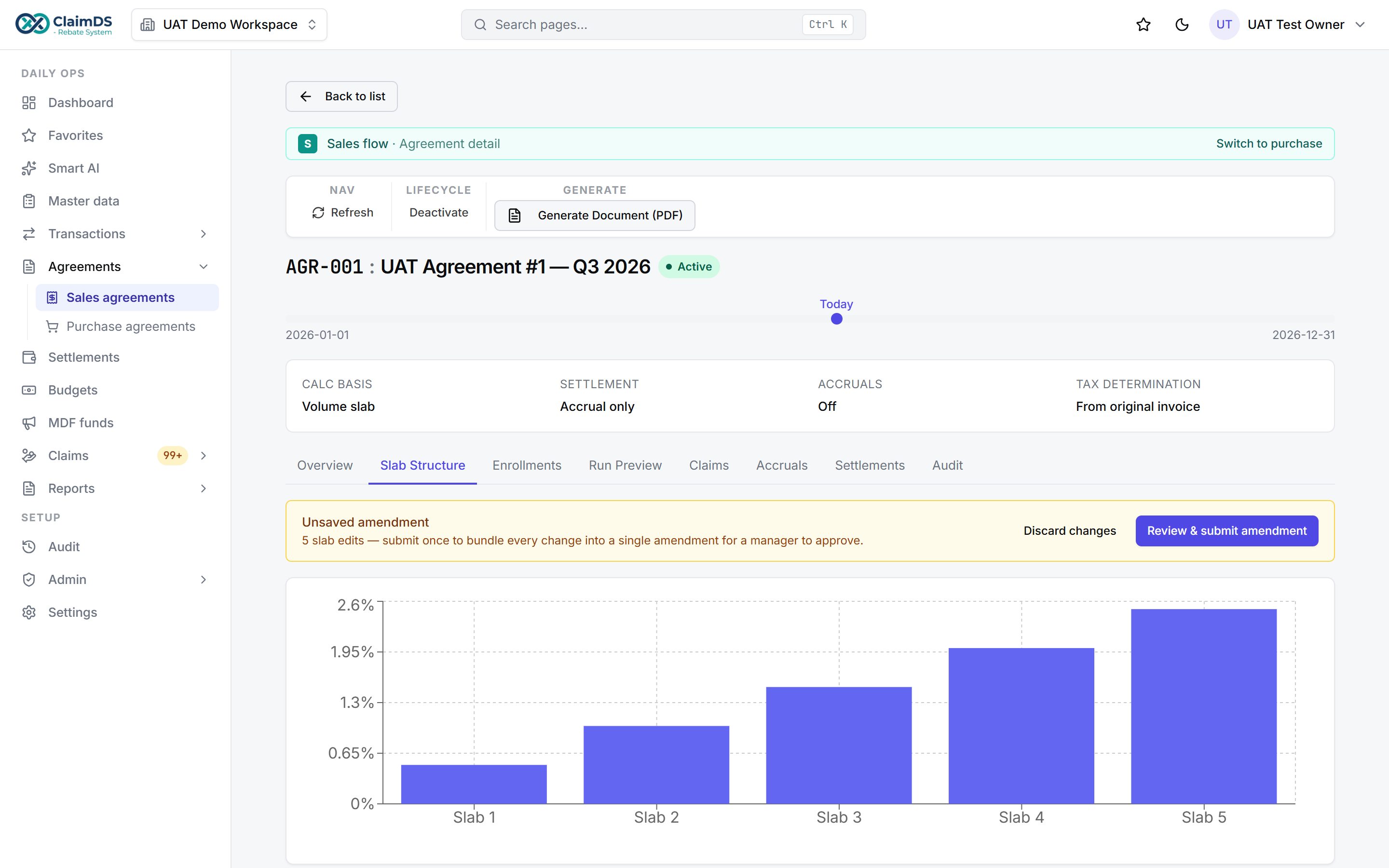 The migration destination: a spreadsheet scheme rebuilt as a structured, validating agreement. <!-- TODO: confirm capability wording with founder -->
Common migration mistakes
- Migrating dirty data. Importing before you clean partner names, SKU codes and dates just moves the mess into a system that will keep flagging it.
- Bringing all history. Re-keying years of settled claims is expensive and rarely repaid; archive it and migrate open items only.
- No parallel run. Cutting over without reconciling one full cycle means you discover mapping errors in production, on real money.
- Mapping every quirk. Reproducing each spreadsheet's private conventions defeats the purpose; standardise schemes of the same shape.
- No cutoff date. Without a clear line, "how much history" becomes an open-ended argument and the migration never ends.
Avoiding these is most of what separates a smooth migration from a stalled one.
Bringing it together
Migrating off spreadsheets is a sequence, not a switch: inventory, extract and clean, map to structured agreements, decide history, run parallel, then cut over. Notice what is absent — you never replaced your accounting system. Tally, Busy, SAP or whatever you run stays in place; the claims work simply moves out of workbooks and into a system built for it, working alongside the ERP (see ERP integration and claims management alongside your accounting system). Done in order, it is a well-worn path, not a leap — and a structured rebate management system is where it lands.
Frequently asked questions
How do I migrate rebate management from Excel?
Treat it as a data-and-process migration in six steps: inventory every scheme, agreement and open claim; extract and clean the data; map each scheme to a structured agreement; decide how much history to bring; run one cycle in parallel with your spreadsheets; then cut over. Your accounting system stays untouched throughout — you move the claims work, not the ledger.
What data should I extract from my spreadsheets?
Six data sets: the scheme master, agreement terms (base, rate, slab and window), open claims, accrued balances, the partner and distributor master, and settlement history. Extraction is straightforward; cleaning is the hard part. Fix partner-name spellings, mismatched SKU codes and text-formatted dates before import, because a structured system rejects the mess a spreadsheet quietly tolerated.
How much scheme history should I migrate?
Migrate open items now — in-flight claims and unsettled accruals are live liabilities the new system must carry. Closed, settled history is usually archived as a clean export rather than re-keyed, since it is expensive to clean and rarely queried. Pick a cutoff date, commonly the start of the current financial year, and migrate live data forward from there.
How long does a migration take?
It depends on how many schemes you run and how clean the data is, rather than on the software. The steps are fixed; the variable is cleanup. A single product line with tidy data moves quickly, while a messy multi-scheme estate takes longer. Running one full cycle in parallel adds a settlement period, but prevents expensive surprises at cutover.
Do I have to change my accounting system too?
No. This is the most important thing to understand: moving claims off spreadsheets does not touch your accounting system. Tally, Busy, SAP or any other ERP stays exactly where it is. You move rebate, scheme and claim work into a system built for it, which then works alongside the ERP rather than replacing it.
Should I run spreadsheets and the new system in parallel?
Yes — run one complete claim-and-settlement cycle in both, then reconcile them. Where the accruals, claim values or settlement figures differ, the gap points to a mapping error or dirty data you can fix before going live. Only once the two agree do you make the new system the source of truth and retire the spreadsheet.
See ClaimDS on your own claims data
A 30-minute walkthrough tailored to how your channel actually settles claims.
Related posts

Scheme and Claim Management Beside Your Accounting System
What belongs in your accounting system and what belongs in a claims system beside it — schemes, claims, accruals and settlements, whatever ERP you run.
How Much Does Rebate and Claims Software Cost in India?
What Indian manufacturers actually pay for scheme and claims software — pricing models, what drives cost, the costs quotes leave out, and how to compare.
Managing Rebates, Schemes and Claims When You Run Busy
How Indian distributors and manufacturers on Busy handle rebates, trade schemes and claims — where the ledger ends and the claims workflow begins.